%20--%3e%3csvg%20version='1.1'%20id='Layer_1'%20xmlns='http://www.w3.org/2000/svg'%20xmlns:xlink='http://www.w3.org/1999/xlink'%20x='0px'%20y='0px'%20viewBox='0%200%2031.9%2032'%20style='enable-background:new%200%200%2031.9%2032;'%20xml:space='preserve'%3e%3cstyle%20type='text/css'%3e%20.st0{fill:%230D7BBA;}%20%3c/style%3e%3cg%3e%3cg%3e%3cg%3e%3cg%3e%3cg%3e%3cpolyline%20class='st0'%20points='17.6,26.6%2029.4,14.8%2031.9,17.2%2017.6,31.5%205.1,18.9%207.5,16.4%20'/%3e%3c/g%3e%3c/g%3e%3c/g%3e%3cg%3e%3cg%3e%3cg%3e%3cpolygon%20class='st0'%20points='26.8,12.7%2017.7,21.8%2015.3,19.3%2021.9,12.7%2019.4,10%2012.6,16.7%2010.2,14.3%2016.8,7.6%2014.3,5%202.5,16.7%200,14.3%2014.3,0.1%20'/%3e%3c/g%3e%3c/g%3e%3c/g%3e%3c/g%3e%3c/g%3e%3c/svg%3e)
3D Printing Dashboard — An Operational Dashboard for Printer Management
Operational dashboard for managing and monitoring 3D printers. Designed to give operators clear visibility into print jobs, machine status, and production metrics at a glance.
Overview
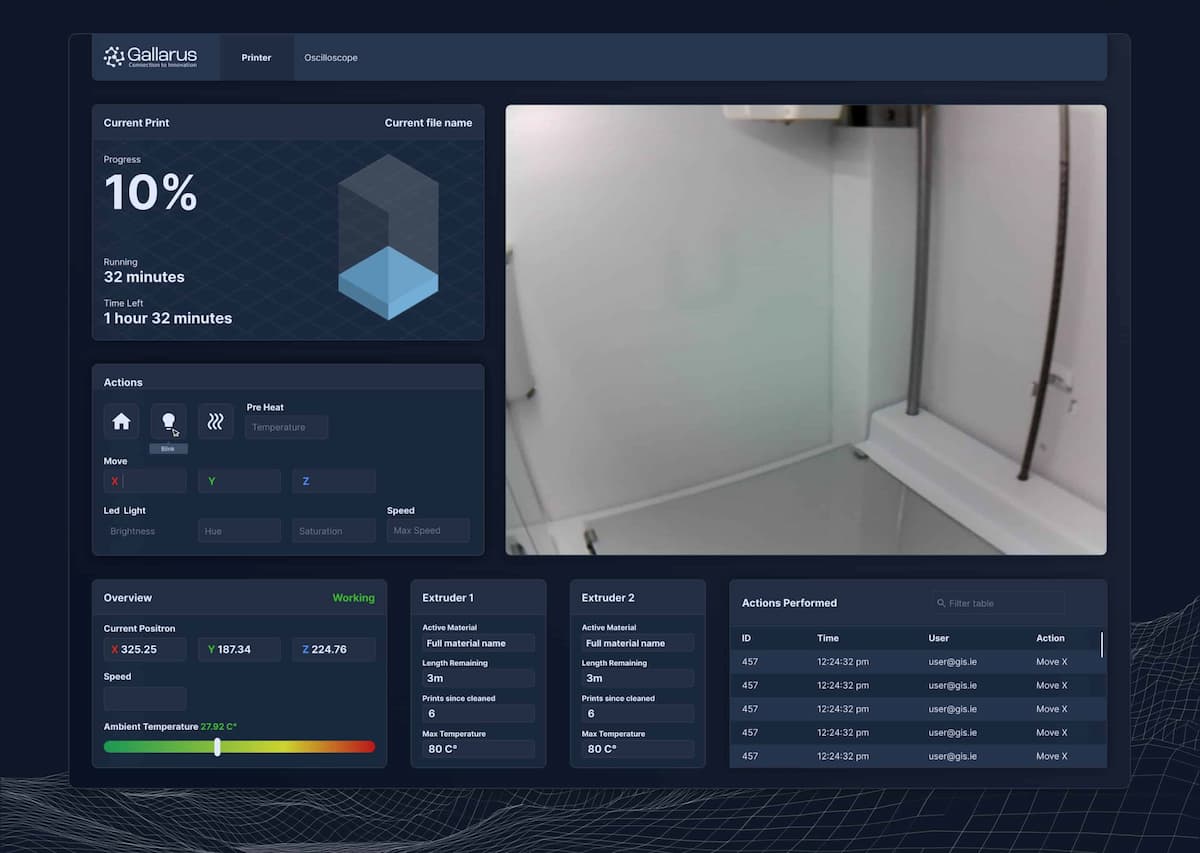
An operational dashboard designed for managing 3D printing workflows and monitoring printer status. The interface provides clear visibility into active print jobs, machine health, and production metrics, enabling operators to manage multiple printers efficiently and respond quickly to issues. Built with a focus on clarity and practical usability in production environments.
My Role
- UX / UI Design
- Dashboard Architecture
- Data Visualization
- Interaction Design
- Assets / Handoff
Key Features
Printer status overview
Real-time status cards for each printer showing current job, progress, and machine health at a glance.
Print job management
Queue management and job tracking that lets operators monitor, prioritize, and manage active and upcoming prints.
Production metrics
Key performance indicators including print success rates, uptime, and material usage to optimize operations.
Alert & notification system
Clear alerts for print failures, material depletion, and maintenance needs so issues are caught early.
Clean, scannable layout
A structured grid that organizes information logically, reducing time needed to assess overall production status.
Responsive layout
Works across desktop monitors and tablets for use in both control rooms and on the production floor.
Screenshots
Tech Stack
Final Thoughts
This dashboard was designed to bring order to the complexity of managing multiple 3D printers simultaneously. By focusing on clear status indicators, job tracking, and production metrics, the interface helps operators stay on top of their workflow and respond to issues before they become problems.
Want to see it live?